2026-06-12
Build Your First RAG
Five parts of theory, now one running program. Part 6 of a from-scratch series on Retrieval-Augmented Generation: build a complete chat-with-your-documents app by hand in Python, no framework hiding the mechanics. Embed with a local model, store vectors in plain NumPy, score by cosine similarity, retrieve top-k, ground the prompt, and generate, then swap in a real vector database. Every line ties back to a concept you already learned.
What you’ll learn
This is the payoff. For five parts we built understanding: why RAG exists (Part 1), what embeddings are (Part 2), how cosine similarity ranks chunks (Part 3), how vector databases retrieve fast at scale (Part 4), and how to split documents into good chunks (Part 5). Now we turn all of it into a single, running program: a small “chat with your documents” app you can paste into a file and run today. We build it by hand, from primitives, so you understand every line rather than trusting a framework to hide the mechanics. By the end you’ll have a working app, and you’ll be able to point at each function and name the concept it implements.
Prerequisites
Parts 1 through 5, especially Embeddings (Part 2), Measuring Similarity (Part 3), and Documents and Chunking (Part 5). You need basic Python (functions, lists, dictionaries) and a terminal where you can pip install packages. That is all.
The payoff: five parts become one program
Every RAG system, under the marketing, is the same short loop. Take the user’s question, find the most relevant chunks of your own documents, paste those chunks into the prompt alongside the question, and let a language model answer from them. Retrieve, augment, generate. We have studied each piece in isolation; this part wires them together into one file you control end to end. We deliberately avoid the big frameworks (LangChain, LlamaIndex) for the core build, because they paper over exactly the mechanics we spent five parts learning. They are genuinely useful for compressing this later, and I will say where, but you should build it once by hand first. You will never be mystified by a RAG pipeline again.
The stack, and why
Here is the stack, chosen so a first build is transparent, local, and low or zero cost.
- Python, because it is where this ecosystem lives.
- Embeddings:
sentence-transformersrunning a small model locally. It is free, runs offline, and needs no API key, which makes it perfect for learning. This is Part 2 made real. - Vector store: we start with the most transparent store imaginable, a Python list of chunks plus a NumPy array of their vectors, and we compute cosine similarity ourselves. Nothing is hidden. This is Part 3 made real. Then we upgrade to a real embedded vector database, Chroma, which runs locally with no server, reinforcing Part 4.
- Generation: we hide the language model behind a single
generate(prompt)function so the provider is a one-function swap. We show it with a mainstream hosted API and give Ollama, a local model runner, as the zero-cost, no-key alternative.
One honest caveat before any code: LLM SDK syntax, model names, and versions move fast, and I have a knowledge cutoff. Treat the provider-specific lines as a snapshot, check the current docs for the exact import and model name, and notice that we keep all of that in one tiny function so a change touches one place.
Install what we need:
pip install sentence-transformers numpy openai chromadbFor generation you need one of: an API key for your hosted provider (set it as an environment variable, never hard-code it), or Ollama installed locally with a model pulled (ollama pull llama3.1). The embedding model downloads itself automatically on first run.
Step 0: a tiny corpus
You cannot tell whether retrieval works unless you can check it by hand, so we start with a knowledge base small enough to hold in your head: a handful of short documents about one online store’s policies. This is our corpus.
CORPUS = [
    "Refunds are accepted within 30 days of purchase, provided the item is unused and in its original packaging.",
    "To start a return, email support@example.com with your order number. Refunds are processed within five business days of us receiving the item.",
    "Standard shipping takes 3 to 5 business days. Express shipping arrives the next business day.",
    "Shipping fees are non-refundable, and items marked final sale cannot be returned or exchanged.",
    "All electronics include a one-year limited warranty covering manufacturing defects.",
]
Five short facts. When we ask “What is our refund window?”, we already know the right answer lives in the first document. That lets us trust the machinery as we build it.
Step 1: load and chunk
In a real system you would load PDFs or HTML and split them with a chunker from Part 5. Our documents are each a single short sentence, so each document is already one chunk. We still pass them through a chunk step, because that is where chunking and metadata belong, and we keep a source field on every chunk so we can cite it later.
def chunk(corpus):
    # Each doc is already chunk-sized; we attach metadata as we go (Part 5).
    return [{"text": doc, "source": f"doc_{i}"} for i, doc in enumerate(corpus)]

chunks = chunk(CORPUS)
print(len(chunks), "chunks")
print(chunks[0])
Output:
5 chunks
{'text': 'Refunds are accepted within 30 days of purchase, provided the item is unused and in its original packaging.', 'source': 'doc_0'}
Step 2: embed
Now we turn each chunk’s text into a vector with the local model. This is the embedding step from Part 2: similar meanings become nearby points.
from sentence_transformers import SentenceTransformer

model = SentenceTransformer("all-MiniLM-L6-v2")  # small, fast, 384 dimensions

def embed(texts):
    # normalize_embeddings=True makes every vector length 1, so a dot
    # product IS cosine similarity later (the trick from Part 3).
    return model.encode(texts, normalize_embeddings=True)

vectors = embed([c["text"] for c in chunks])
print(vectors.shape)
Output:
(5, 384)Five chunks became a 5-by-384 matrix: one 384-dimensional vector per chunk. Note the normalize_embeddings=True. Part 3 showed that cosine similarity is just the dot product of unit-length vectors, so by normalizing here we earn the right to score with a plain dot product later.
Step 3: store
A “vector store” sounds heavy. At its heart it is two things kept side by side: the chunks (text plus metadata) and the matrix of their vectors. Ours lives entirely in program memory, an in-memory store, the simplest kind. We already have both.
# That is the entire store: `chunks` (text + metadata) and `vectors` (the matrix).
# We keep the text next to the vectors because the vector is only used to FIND
# a chunk; the text is what we will actually feed the model.
That comment is the whole lesson of Part 4’s “a database is more than the math”: the embedding finds the chunk, but the stored text is what gets used. Keep them together.
Step 4: retrieve
This is the heart, and it is pure Part 3. Embed the query with the same model, score it against every chunk vector with cosine similarity, and keep the top-k.
import numpy as np

def retrieve(query, k=3):
    q = embed([query])[0]            # same model as the chunks. This matters.
    scores = vectors @ q             # dot product = cosine, because all are unit length
    top = np.argsort(-scores)[:k]    # indices of the k highest scores
    return [(chunks[i]["text"], float(scores[i])) for i in top]

for text, score in retrieve("What is our refund window?"):
    print(f"{score:.2f}  {text}")
Output:
0.61  Refunds are accepted within 30 days of purchase, provided the item is unused and in its original packaging.
0.34  To start a return, email support@example.com with your order number. Refunds are processed within five business days of us receiving the item.
0.18  Shipping fees are non-refundable, and items marked final sale cannot be returned or exchanged.
There it is: vectors @ q is the cosine similarity from Part 3, computed against all chunks at once, and argsort keeps the top-k. The refund document wins by a mile, exactly as we predicted. (The exact scores will shift with the model version; it is the ranking, not the precise decimals, that matters.) The single most common beginner bug hides in line one: you must embed the query with the same model you embedded the chunks with, or the vectors live in different spaces and the scores are meaningless.
Step 5: augment
Retrieval found the right chunks. Now we build the prompt that wraps them around the question. We use a prompt template: a fixed string with slots for the retrieved context and the user’s question. Filling that context slot with the retrieved chunks is context injection, and we add an explicit grounding instruction that tells the model to answer only from the context and to admit when it cannot.
PROMPT_TEMPLATE = """Answer the question using ONLY the context below.
If the answer is not in the context, say "I don't know based on the provided documents."

Context:
{context}

Question: {question}
Answer:"""

def build_prompt(query, retrieved):
    context = "\n".join(f"- {text}" for text, _score in retrieved)
    return PROMPT_TEMPLATE.format(context=context, question=query)

print(build_prompt("What is our refund window?", retrieve("What is our refund window?")))
Output:
Answer the question using ONLY the context below.
If the answer is not in the context, say "I don't know based on the provided documents."

Context:
- Refunds are accepted within 30 days of purchase, provided the item is unused and in its original packaging.
- To start a return, email support@example.com with your order number. Refunds are processed within five business days of us receiving the item.
- Shipping fees are non-refundable, and items marked final sale cannot be returned or exchanged.

Question: What is our refund window?
Answer:
That grounding instruction is the antidote to the hallucination problem from Part 1. By telling the model to use only the provided context and to say “I don’t know” otherwise, we turn a confident guesser into something that answers from your documents or admits the gap. It is not a guarantee, but it is the single highest-leverage line in the whole prompt.
Step 6: generate
The last piece is the model call, isolated behind one function so the provider is a single swap.
def generate(prompt):
    from openai import OpenAI
    client = OpenAI()                  # reads the API key from your environment
    resp = client.chat.completions.create(
        model="gpt-4o-mini",           # a small, cheap chat model; check current names
        messages=[{"role": "user", "content": prompt}],
        temperature=0,                 # we want grounded, not creative
    )
    return resp.choices[0].message.content
Prefer to run fully local and free? Swap the body for Ollama and change nothing else:
def generate(prompt):
    import requests
    r = requests.post(
        "http://localhost:11434/api/generate",
        json={"model": "llama3.1", "prompt": prompt, "stream": False},
    )
    return r.json()["response"]
Because every other function talks to generate(prompt) and nothing else, switching providers, or mocking it in a test, touches exactly this one place.
Step 7: wrap it into an app
Three lines tie the loop together: retrieve, augment, generate. Then a tiny read-eval-print loop (a REPL) makes it feel like a real app.
def ask(question, k=3):
    retrieved = retrieve(question, k=k)   # Part 3 + 4: find relevant chunks
    prompt = build_prompt(question, retrieved)  # Part 5 + 1: ground the prompt
    return generate(prompt)               # the LLM answers from the context

if __name__ == "__main__":
    print("Ask about the store policy (Ctrl-C to quit).\n")
    while True:
        try:
            q = input("> ").strip()
            if q:
                print(ask(q), "\n")
        except (EOFError, KeyboardInterrupt):
            print("\nBye.")
            break
Run it and try a couple of questions, including one whose answer is not in the corpus:
> What is our refund window?
You can get a refund within 30 days of purchase, as long as the item is unused and in its original packaging.

> Do you offer gift wrapping?
I don't know based on the provided documents.
The second answer is the whole point. The corpus says nothing about gift wrapping, retrieval returns only weakly related chunks, and the grounding instruction makes the model refuse instead of inventing a policy. That honest “I don’t know” is RAG working as designed.
You can grab the complete, runnable file here: rag_app.py and requirements.txt.
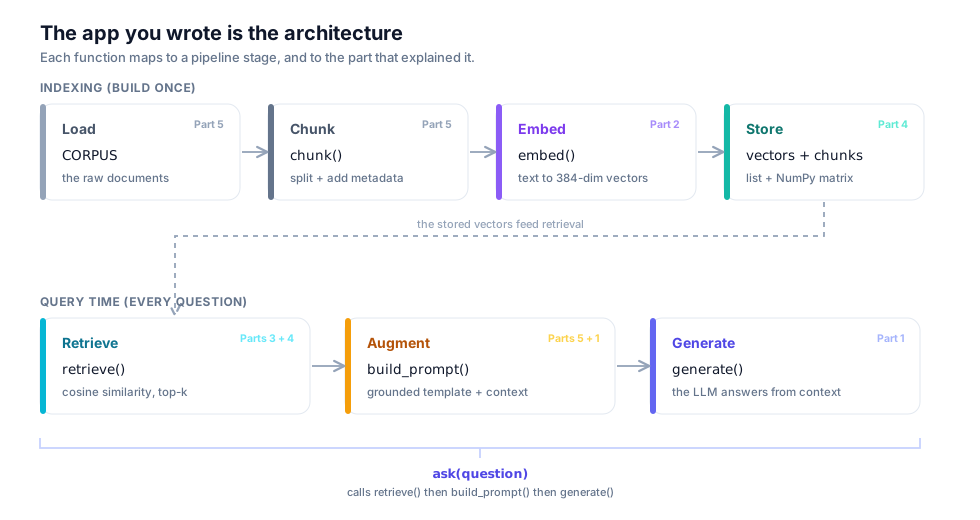
The diagram below lines up the functions you just wrote against the pipeline stages from Part 1: a one-time ingestion phase (load, chunk, embed, store) and a per-question phase (retrieve, augment, generate). The program is the architecture.
To feel the query-time flow one step at a time, pick a question below and watch it move through embedding, scoring, top-k, the assembled prompt, and the grounded answer. The last preset has no answer in the corpus, so you can watch the refusal happen.
The upgrade: swap in a real vector database
The hand-rolled store taught us exactly what a vector store does. In production you would let a real one do the embedding, storage, and indexing, the work of Part 4. Here is the same app with Chroma, a local embedded database, dropped in. Watch how add and query collapse our manual embed-store-cosine code into two calls.
import chromadb
from chromadb.utils import embedding_functions

client = chromadb.Client()   # in-memory; use PersistentClient(path="...") to keep it
ef = embedding_functions.SentenceTransformerEmbeddingFunction(
    model_name="all-MiniLM-L6-v2"        # the SAME model as before
)
collection = client.create_collection(
    "policy",
    embedding_function=ef,
    metadata={"hnsw:space": "cosine"},   # match the cosine metric we used by hand
)

# add() embeds and stores in one call; ids and metadata travel with the text
collection.add(
    documents=[c["text"] for c in chunks],
    ids=[c["source"] for c in chunks],
)

def retrieve(query, k=3):
    res = collection.query(query_texts=[query], n_results=k)
    # Chroma returns distances, where smaller means closer (Part 4's metrics)
    return list(zip(res["documents"][0], res["distances"][0]))
That is the only change. The ask, build_prompt, and generate functions are untouched, because the interface (give me a query, get back relevant chunks) is the same. Chroma is now doing the indexing and nearest-neighbor search we wrote by hand, and it will keep doing it when your five documents become five million. One note worth getting right: Chroma reports a distance (smaller is closer), not a similarity (larger is closer). With the cosine space we configured, that distance is 1 - cosine_similarity, so for the unit vectors we use it runs from 0 (identical) to 2 (opposite), not 0 to 1, and orthogonal lands at 1.0, not 0.5. Recover a familiar similarity you can sort or threshold on with 1 - distance. So if you ever sort or threshold on the number, mind both the direction and the scale, exactly the similarity-versus-distance trap from Part 3.
Cost, latency, and the gotchas that bite first
A working app is not yet a good one. A few things to keep in view:
- Cost and latency. Local embeddings are free but use your CPU or GPU; hosted LLM calls cost money per token and add network latency, and hosted APIs enforce rate limits. The local LLM (Ollama) is free and private but slower and usually weaker than a big hosted model. Pick your trade-off deliberately.
- The same-model rule. Embed your query with the same model you embedded the chunks with. Mixing models is the classic silent failure: no error, just quietly meaningless scores and nonsense retrieval.
- Tuning top-k. Too low and you starve the model of context; too high and you bury the answer in noise and waste tokens. Start around 3 to 5 and adjust by watching real results.
- Handle the empty case. Decide what happens when nothing relevant is found. Our grounding instruction already nudges the model to say “I don’t know”; you can also threshold on the top score and skip the LLM entirely when the best match is too weak. (If you are on the Chroma path, convert its distance back to a similarity with
1 - distancefirst, since its number runs0to2, not0to1.)
Try it yourself
The app runs; now poke it until you understand where it breaks. Three small experiments, each touching a different part of the loop.
Add a relevance floor. Right now every question reaches the LLM, even one whose best chunk barely clears noise. Threshold on the top score and short-circuit before you spend a model call:
RELEVANCE_FLOOR = 0.30   # tune by watching real top scores; cosine, unit vectors

def ask(question, k=3):
    retrieved = retrieve(question, k=k)
    if not retrieved or retrieved[0][1] < RELEVANCE_FLOOR:
        return "I don't know based on the provided documents."
    prompt = build_prompt(question, retrieved)
    return generate(prompt)
Ask “Do you offer gift wrapping?” and watch it return the refusal without ever calling the model. With the hand-rolled store the top score is already a cosine similarity, so the comparison is direct. On the Chroma path you get a distance instead, so convert first with 1 - distance (and remember that number runs 0 to 2, not 0 to 1) before comparing against the floor.
Surface the source as a citation. We kept a source field on every chunk in Step 1 and then quietly dropped it at retrieval. Carry it through so the answer can point at where it came from. Have retrieve return the chunk’s source alongside its text and score, then print the cited documents under the answer:
def retrieve(query, k=3):
    q = embed([query])[0]
    scores = vectors @ q
    top = np.argsort(-scores)[:k]
    return [(chunks[i]["text"], chunks[i]["source"], float(scores[i])) for i in top]
Adjust build_prompt to unpack the extra field, and you can append a line like Sources: doc_0, doc_1 to every grounded answer. That is the difference between a demo and something a user can trust: a claim they can click back to.
Break it on purpose. Embed the query with a different model than the chunks and watch retrieval quietly fall apart. Keep the chunks on all-MiniLM-L6-v2 but encode the query with, say, paraphrase-MiniLM-L3-v2, and the scores become noise: no exception, no warning, just wrong chunks at the top. (If you pick a model with a different output width the dot product will at least raise a shape error, which is a kinder failure; the dangerous case is two 384-d models whose spaces simply do not line up.) This is the most expensive bug in RAG precisely because nothing crashes. Live through it once here, deliberately, so you recognize the symptom (plausible-looking retrieval that is subtly always wrong) when it happens for real.
Start from the complete base app, rag_app.py, and graft each experiment onto it: the source field is already on every chunk, so the citation change is small, and the floor and the broken-model test are a few lines each.
⚠️ Common pitfalls
- Different embedding models for query and chunks. The single most common silent failure. Same width, different space, meaningless scores, no error. Pin the model name in one constant and reuse it everywhere.
- Forgetting to normalize before the dot product.
vectors @ qis cosine only when both sides are unit length. Dropnormalize_embeddings=Trueand your dot product is an unbounded magnitude score that no longer matches the ranking you reasoned about in Part 3.- Comparing a Chroma distance against a cosine threshold. Chroma returns a distance (smaller is closer, range
0to2), not a similarity. Threshold the raw distance against a0-to-1cosine floor and your relevance gate fires backwards.- No empty case. Without a relevance floor every off-topic question still triggers a paid, latent model call, and you lean entirely on the grounding instruction to catch it. Belt and suspenders: gate on the score and keep the “answer only from context” instruction.
How fast, and how much?
A few concrete numbers, because “free and local” and “fast” are easy to say and worth pinning down.
- Embedding.
all-MiniLM-L6-v2produces 384-dimensional vectors and is small by model standards (roughly 90 MB of fp32 weights, ~23M parameters). On a plain CPU it embeds on the order of a few thousand short sentences per second, fast enough that our five-document corpus, or a few thousand, is effectively instant; on a GPU it is faster still. The point: for a personal corpus, embedding is not your bottleneck. (See the model card for the exact spec.) - Generation latency. This is where the wall-clock time goes. A hosted LLM call typically returns a short grounded answer in roughly one to a few seconds, network round-trip included, and it costs money per token and enforces rate limits. A local model under Ollama costs nothing and keeps your data on your machine, but on CPU-only hardware a comparable answer often takes several seconds to tens of seconds; a GPU narrows that gap a lot. The trade-off is the usual one: hosted buys you speed and quality for money and a dependency; local buys you privacy and zero marginal cost for latency and a weaker model. Measure both on your hardware before you commit; the numbers above are order-of-magnitude, not promises.
Recap, and the road ahead
You built a complete RAG application from primitives and understood every line: a tiny corpus, chunking with metadata, local embeddings, a transparent vector store, cosine top-k retrieval, a grounded prompt template, an isolated model call, and a REPL to drive it, then a one-component swap to a real vector database. Nothing about it is mysterious anymore.
It is also, deliberately, a naive system. It does pure dense retrieval (one embedding model, cosine similarity) with a fixed k and a fixed prompt. That works surprisingly well, and it is also where the interesting engineering begins. What if the best chunk uses different words than the question? What if you want to combine keyword search with semantic search? How should k adapt to the query? That is the retrieval deep dive, and it is Part 7.
Key takeaways
- A RAG app is one short loop: retrieve relevant chunks, augment the prompt with them, generate an answer. We built it by hand so every line maps to a concept from Parts 1 through 5.
- Use a local embedding model (free, offline) and embed the query with the same model as the chunks. This single rule prevents the most common silent failure.
- The simplest vector store is a list of chunks plus a NumPy matrix; cosine top-k retrieval is one
argsortover a dot product (Part 3). Keep the chunk text beside its vector. - A prompt template with a grounding instruction (“answer only from the context; otherwise say you don’t know”) is the highest-leverage line for curbing hallucination (Part 1).
- Isolate the LLM behind one
generate(prompt)function so switching providers, hosted or local, is a one-line change. - Graduating to a real vector database like Chroma swaps out the storage and indexing without touching the rest of the app, because the retrieve interface stays the same (Part 4).
References
- Patrick Lewis, Ethan Perez, Aleksandra Piktus, Fabio Petroni, Vladimir Karpukhin, Naman Goyal, Heinrich Küttler, Mike Lewis, Wen-tau Yih, Tim Rocktäschel, Sebastian Riedel, and Douwe Kiela. “Retrieval-Augmented Generation for Knowledge-Intensive NLP Tasks.” NeurIPS 2020. arXiv:2005.11401. The paper that named and formalized RAG, the retrieve-augment-generate loop this whole app implements.
- Nils Reimers and Iryna Gurevych. “Sentence-BERT: Sentence Embeddings using Siamese BERT-Networks.” EMNLP 2019. arXiv:1908.10084. The work behind the
sentence-transformerslibrary (sbert.net) we use to embed chunks and queries. all-MiniLM-L6-v2model card, Hugging Face: sentence-transformers/all-MiniLM-L6-v2. The small, fast, 384-dimensional embedding model driving retrieval in this part.
Glossary
- Corpus (knowledge base): the collection of source documents your RAG system can draw on to answer questions.
- Ingestion: the one-time pipeline that prepares the corpus for retrieval, loading, chunking, embedding, and storing it.
- In-memory store: a vector store held in program memory (here, a Python list of chunks plus a NumPy array of vectors), transparent and simple but lost when the program exits.
- Prompt template: a fixed prompt string with slots for the retrieved context and the user’s question, filled in at query time.
- Context injection: inserting the retrieved chunks into the prompt so the model can answer from them.
- Grounding (grounded generation): instructing the model to answer only from the provided context and to admit when the answer is not there; the core defense against hallucination.
- REPL: a read-eval-print loop, the simple interactive prompt that reads a question, runs the app, prints the answer, and repeats.
- Top-k: returning the
khighest-scoring chunks for a query;kis a small number you tune (often 3 to 5).
Next up, Part 7: Retrieval Deep Dive. Our app uses plain dense retrieval with a fixed k. Next we make retrieval smarter: dense versus sparse search, combining them into hybrid search, and choosing k with more intelligence than a constant.