2026-06-09
Measuring Similarity
Relevant just means close in embedding space, but how do you turn 'close' into a single number you can rank by? Part 3 of a from-scratch series on Retrieval-Augmented Generation: Euclidean distance, the dot product, and why cosine similarity, which measures direction and ignores length, is the default for scoring chunks in RAG.
What you’ll learn
Part 2 ended on a promise and a debt. The promise: once text is an embedding, a vector where similar meanings sit close together, “find the relevant chunk” becomes “find the nearest point.” The debt: I kept saying “close” and “nearest” without ever saying how a computer actually measures closeness between two vectors. This part pays that debt. By the end you’ll know the three ways people measure it, Euclidean distance, the dot product, and cosine similarity, what each one really “sees,” why cosine is the default for text, and how all three are secretly the same calculation wearing different clothes. We stay conceptual and lead with intuition, but this is the math chapter, so we’ll also work one example by hand, on paper, with numbers you can check yourself.
Prerequisites
Parts 1 and 2: Why RAG Exists and Embeddings, Truly Understood. You should be comfortable with the idea that a piece of text becomes a vector (an ordered list of numbers, also a point or arrow in space) and that meaning shows up as direction and distance in that space. Basic Python helps for the one tiny snippet, but the heart of this part is arithmetic a calculator can do.
The debt from Part 2: turning “close” into a number
Here is the exact moment we have to handle. A user asks our running question, “What is our refund window?”, and we embed it into a query vector. Sitting in our vector store are the embeddings of every chunk of refund-policy.md, including the one that reads “Refunds are accepted within 30 days of purchase.” Retrieval has to pick the best chunk. To pick, it has to rank. To rank, it needs a single number for each chunk that says how similar is this chunk’s vector to the query’s vector?
That number is a score, and the function that produces it is a similarity metric. Everything in this part is about choosing that function well, because the chunk that wins the score is the chunk the model reads, and Part 1 already warned us: flip to the wrong page and the model is confidently wrong about that page. The score is the page-flipper.
Similarity vs. distance: same idea, opposite direction
Before any formula, clear up one confusion that trips up almost everyone, because the two words point opposite ways.
- A similarity score goes up as two vectors become more alike. Higher is better; a perfect match is the maximum.
- A distance goes down as two vectors become more alike. Lower is better; a perfect match is zero.
They measure the same underlying thing and you can usually turn one into the other, but the direction of “good” flips. So when someone says “we sort by similarity” they keep the largest scores, and when they say “we sort by distance” they keep the smallest. Keep that straight and half the confusion in this area disappears. With that settled, here are the three metrics, from most intuitive to most useful.
Euclidean distance: the straight-line gap
The most intuitive measure of “how far apart” is the one you already use in the physical world: the straight-line distance between two points. That is Euclidean distance, and it is exactly the Pythagorean theorem you met in school, just allowed to run in as many dimensions as the embedding has.
In words: take the difference between the two vectors component by component, square each difference, add them up, and take the square root. For vectors A and B:
euclidean(A, B) = √((A₁ − B₁)² + (A₂ − B₂)² + … + (Aₙ − Bₙ)²)
It is a distance, so smaller means more similar, and identical vectors score 0. It is wonderfully concrete: it is the length of the line you’d draw between the two arrowheads.
So why isn’t this the end of the article? Because for text, Euclidean distance has an awkward sensitivity: it cares about magnitude, the length of the vectors, not just their direction. And magnitude is often information we do not want to rank on. For many raw, un-normalized embeddings a vector’s length partly tracks incidental things, like how long or emphatic a passage is, rather than its topic, so two notes about the very same subject can sit at different distances from the origin, and Euclidean, which folds that length into its score, can be thrown off by it. What we actually want to compare is the direction the vector points, because that is where the model puts meaning. We need a metric less fooled by length. (As we will see in a moment, once vectors are normalized this gap closes entirely; the warning here is really about leaving them un-normalized.)
Dot product: overlap, blended with length
The next tool is the dot product (sometimes the “inner product”). Its recipe is even simpler than Euclidean distance: multiply the two vectors together component by component, then add up the results.
A · B = A₁B₁ + A₂B₂ + … + AₙBₙ
The dot product is a similarity, so bigger means more aligned. It has a lovely property: it quietly blends two different things at once, how much the vectors point the same way (their angle) and how long they are (their magnitudes). Two vectors aimed in the same direction give a big positive dot product; at right angles they give 0; pointing opposite ways they give a negative number.
Its great practical strength is speed. A dot product is just multiplies and adds, the operation hardware is most optimized for, so it is what actually runs under the hood when a vector store scores a query against millions of chunks. We’ll lean on that in Part 4.
But it has the mirror-image weakness of being unnormalized: because it folds magnitude into the score, a longer vector scores higher regardless of direction. A chunk whose embedding happens to be “louder” (larger magnitude) can beat a chunk that actually points more truly at the query, winning on size alone. That is rarely what we want for meaning. We want a metric that listens to direction and turns the volume knob off entirely.
Cosine similarity: direction only
That metric is cosine similarity, and it is the star of this chapter. The idea is to throw away length completely and measure only the angle between the two vectors: cosine similarity is the cosine of that angle.
cosine(A, B) = (A · B) / (‖A‖ × ‖B‖)
The notation ‖A‖ means the magnitude (or norm) of A, its length, computed exactly like Euclidean distance from the origin: ‖A‖ = √(A₁² + A₂² + … + Aₙ²). So cosine similarity is just the dot product divided by both lengths, which is precisely the step that cancels magnitude out. What survives the division is pure direction.
The intuition to carry around: cosine asks “are these two arrows pointing the same way?” and pointedly refuses to ask “are they the same size?” Its value runs from -1 (pointing exactly opposite) through 0 (at right angles, unrelated) to 1 (pointing in exactly the same direction), and a value near 1 is what retrieval is hunting for. One practical caveat: trained text embeddings rarely produce near-zero cosines even for unrelated text, because their vectors crowd into a narrow cone, so the useful spread is a compressed positive band (often something like 0.3 to 0.9) rather than a clean 0 to 1. Because that band shifts from one model to the next, raw cosine values are not comparable across models, which is why retrieval thresholds get tuned per model rather than fixed at a round number like 0.5 (we do exactly that in Part 11).
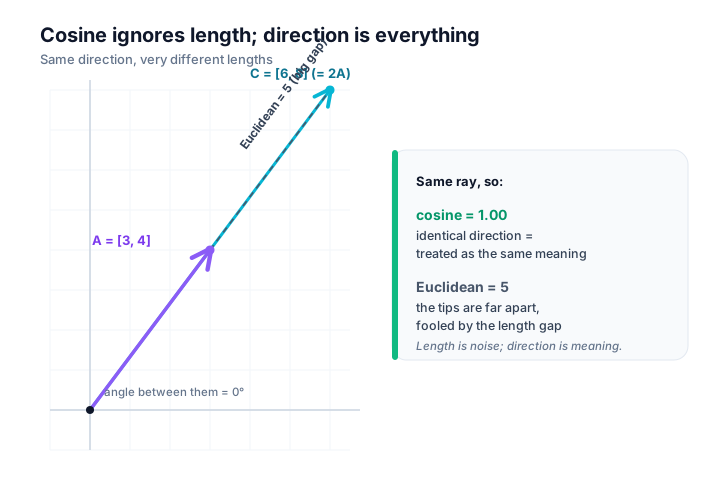
Why is “direction only” exactly right for text? Because that is where embedding models put the meaning. Two passages about the same idea are trained to point the same way, even if one is a sentence and one is a paragraph and their magnitudes differ. By scoring the angle and ignoring the length, cosine similarity reads the part the model actually encodes meaning into and discards the part (length) that is mostly noise for this purpose. That is the whole reason cosine similarity is the default metric in RAG. Below you can feel it directly: two vectors pointing the same way are treated as a near-perfect match no matter how different their lengths are.
The ‘aha’: all three are the same calculation
Here is the insight that ties the chapter together, and it is genuinely satisfying.
Look again at the cosine formula: it is the dot product, divided by the two magnitudes. Now suppose we first rescale each vector so its length is exactly 1, keeping its direction but standardizing its size. Rescaling a vector to length 1 is called normalization, and the result is a unit vector, written  = A / ‖A‖. Once both vectors are unit-length, their magnitudes are both 1, so dividing by them does nothing, and the cosine formula collapses:
cosine(A, B) = Â · B̂ (the dot product of the normalized vectors)
In words: cosine similarity is just the dot product of normalized vectors. Normalize first, and the dot product is the cosine. This is not a coincidence; it is the same calculation, with the magnitude either divided out at the end (cosine) or stripped away up front (normalize, then dot).
Euclidean distance joins the same family once you normalize. For two unit vectors a little algebra gives euclidean(Â, B̂)² = 2 − 2·cos(Â, B̂): the straight-line gap is just a function of the angle. So on normalized embeddings, which is exactly what most vector stores keep, Euclidean and cosine rank results identically; sorting by one is sorting by the other. Cosine stays the default not because Euclidean is “wrong” on normalized vectors, but because it matches how the models are trained and, once normalized, reduces to the fast dot product. Euclidean only parts ways with cosine when vectors are left un-normalized and their differing lengths start to count, which is the very case we flagged earlier.
That equivalence is quietly load-bearing in real systems. Recall that the dot product is the fast one. So many vector databases do exactly this: they normalize every embedding once, when it is stored, and then at query time they run the cheap dot product, getting cosine similarity’s meaning-focused, length-blind behavior at the dot product’s speed. Best of both. When you read that a database “uses inner product on normalized vectors,” that sentence now means something precise to you: it is computing cosine similarity the efficient way.
When to use which
You now have three metrics. Here is how I decide between them, and a rule that settles most cases instantly.
| Metric | What it measures | Range | Sees magnitude? | Reach for it when |
|---|---|---|---|---|
| Euclidean distance | Straight-line gap between the tips | 0 (identical) and up | Yes | Spatial or coordinate data, or when the length of a vector genuinely carries meaning |
| Dot product | Overlap: angle blended with both lengths | unbounded, can be negative | Yes | You need raw speed at scale, and either your vectors are normalized or length itself is a useful signal |
| Cosine similarity | The angle between directions | about -1 to 1 (in practice a compressed band, often ~0.3–0.9 for text) | No | The default for text embeddings, when only meaning, not length, should count |
The practical rule that overrides the table: match the metric to what the embedding model was trained for. Model creators document the intended similarity measure (most modern text-embedding models are tuned for cosine, and many already output normalized vectors). Use the one they recommend. Picking a metric the model was not trained against is a quiet way to make good embeddings score badly.
Worked example, by hand
Intuition is the point of this part, but a metric you can’t compute is a metric you don’t really trust, so let’s grind through one. We’ll use two tiny 2-dimensional vectors so the arithmetic stays on paper. Real embeddings have hundreds of dimensions, but the procedure is identical, just with more terms to add.
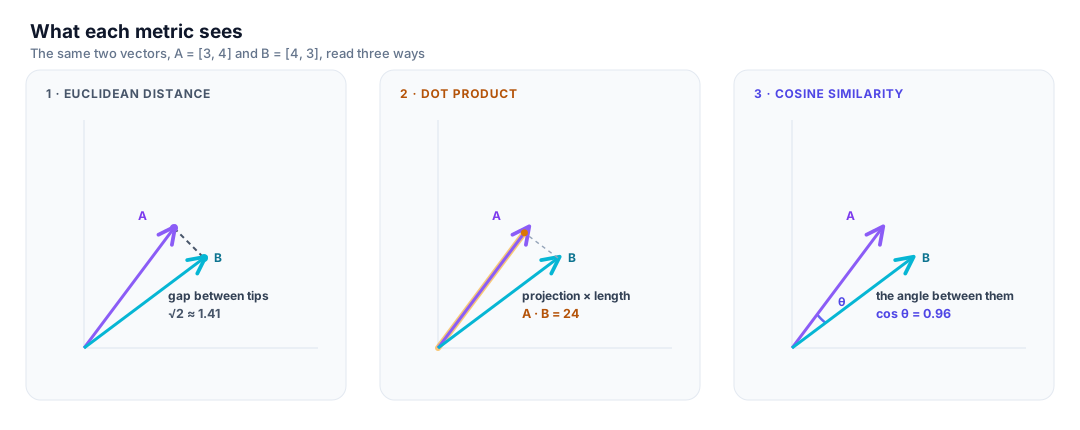
Take A = [3, 4] and B = [4, 3].
Dot product (multiply matching components, add):
A · B = (3 × 4) + (4 × 3) = 12 + 12 = 24
Magnitudes (square the components, add, square-root):
‖A‖ = √(3² + 4²) = √(9 + 16) = √25 = 5
‖B‖ = √(4² + 3²) = √(16 + 9) = √25 = 5
Cosine similarity (dot product over the product of magnitudes):
cosine(A, B) = 24 / (5 × 5) = 24 / 25 = 0.96
A score of 0.96 is very close to 1, so A and B point almost the same way: nearly the same meaning, in embedding terms.
Euclidean distance (differences, squared, summed, square-rooted):
euclidean(A, B) = √((3 − 4)² + (4 − 3)²) = √(1 + 1) = √2 ≈ 1.41
Now the part that makes cosine earn its keep. Replace B with C = [6, 8], which is just A doubled, the exact same direction, twice as long:
cosine(A, C) = (3×6 + 4×8) / (5 × 10) = (18 + 32) / 50 = 50 / 50 = 1.00
euclidean(A, C) = √((3−6)² + (4−8)²) = √(9 + 16) = √25 = 5
Cosine says 1.00: identical direction, a perfect meaning-match. Euclidean says 5: far apart. The dot product, meanwhile, jumped to 50, rewarding C purely for being long. Same three vectors, three very different verdicts, and you can see exactly why each one votes the way it does.
Finally, the equivalence from the ‘aha’ section, made concrete. Normalize A and C:
 = [3, 4] / 5 = [0.6, 0.8]
Ĉ = [6, 8] / 10 = [0.6, 0.8]
They become the same unit vector. Their dot product is (0.6 × 0.6) + (0.8 × 0.8) = 0.36 + 0.64 = 1.00, exactly the cosine. Normalize first, dot product second, and you’ve computed cosine similarity.
If you’d rather see it in code than on paper, it is two lines (illustrative only, not a pipeline to build):
import numpy as np

a, b = np.array([3, 4]), np.array([4, 3])
cosine = a @ b / (np.linalg.norm(a) * np.linalg.norm(b))
print(round(cosine, 2))   # 0.96
Now stop reading and play. The figure below draws two vectors from the origin; drag either tip and watch the angle, cosine similarity, dot product, and Euclidean distance update live. Flip the normalize toggle to snap both vectors to unit length and watch the dot product and cosine slide into agreement, the ‘aha’ made tangible.
Back to RAG: this is the ranking function
Step back to the vector store. We embed the user’s question into a query vector, and for every stored chunk vector we compute a similarity score against it, almost always cosine similarity. That score is the entire basis on which chunks are ranked. Sort the chunks by score, best first, and hand the model the winners.
“The winners” needs a number, and that number is k. Top-k retrieval means: return the k chunks with the highest similarity to the query, where k is a small number you choose, often something like 3 to 10. If k is 4, the model is handed the four most-similar chunks as context and answers from those. Small k keeps the prompt tight and focused (remember the context-window wall from Part 1); larger k casts a wider net at the cost of more noise and tokens. Tuning k is one of the simplest, highest-leverage knobs in a RAG system.
So the picture from Part 1 is now fully colored in: we embed (Part 2), we score every chunk against the query with cosine similarity (this part), and we keep the top k. Which exposes the next problem, the one Part 2 hinted at. Computing a score against every stored vector, called a brute-force or exact search, is perfectly fine for hundreds or a few thousand chunks. But run it against millions, on every single query, and the cost becomes brutal: you’re doing millions of multiply-and-add passes per question. Production systems cannot afford to compare against everything every time. The fix is a smarter data structure that finds the nearest vectors without checking them all, and building that is exactly what Part 4 is about.
⚠️ Common pitfalls
- Comparing absolute cosine scores across different models. A
0.82from one embedding model and a0.82from another are not the same “amount” of similarity. Each model crowds its vectors into a differently shaped cone, so the useful band sits in a different place. Cosine is a within-model ranking signal, not a cross-model unit of meaning; never conclude one model is “more confident” because its numbers run higher.- Assuming a fixed threshold transfers between models. Because the band shifts, the cutoff you tuned for “relevant enough” on one model (say, keep everything above
0.75) can be far too strict or far too loose on the next. Swap the embedding model and you have to re-tune the threshold, not inherit it. Treating0.5, or any round number, as a universal “relevant” line is the same mistake wearing a cleaner shirt.- Mixing metrics between index-build and query time. If you normalized vectors and stored them for inner-product search, you must query with the inner product too. Build with one metric and query with another (cosine at write time, raw dot product at read time, or vice versa) and the rankings quietly degrade without ever throwing an error. Pick one similarity measure and use it end to end.
Try it yourself
Reopen the interactive playground above (Figure 3) and run one deliberate experiment, because feeling this beats reading it. Set both vectors to point in the same direction at different lengths: drag one tip out to roughly (3, 4) and the other along the same ray to about (6, 8), twice as long. Watch what the four numbers do. Cosine similarity sits pinned near 1.00, because the angle between them is zero, while Euclidean distance reads a fat 5 and the dot product balloons. Same direction, wildly different verdicts: this is the worked example from earlier, now under your own hands.
Then flip the normalize toggle. Both arrows snap to unit length, landing on the same point, and the dot product and cosine slide into agreement, both reading 1.00. That is the ‘aha’ made physical: once length is gone, the dot product is the cosine, and Euclidean stops disagreeing. Nudge one tip slightly off the shared ray and watch all four numbers move together but at different rates, so you can feel which metric is sensitive to angle and which is still listening to length. Five minutes of dragging will teach your fingers what a page of formulas only tells your eyes.
Key takeaways
- Retrieval has to rank, and ranking needs a single similarity score per chunk. A similarity goes up as vectors get more alike; a distance goes down. Same idea, opposite direction.
- Euclidean distance is the intuitive straight-line gap, but it is sensitive to magnitude. On normalized vectors that stops mattering (
euclidean² = 2 − 2·cos, so it ranks identically to cosine); the magnitude sensitivity only bites when vectors are left un-normalized. - The dot product is fast (just multiplies and adds) and is what runs at scale, but it is unnormalized: longer vectors score higher regardless of direction.
- Cosine similarity measures the angle only and ignores length, which is exactly right for text because embedding models put meaning in the direction. It is the default metric in RAG.
- The three connect: cosine similarity is the dot product of normalized (unit-length) vectors. Normalize once at storage time, then use the cheap dot product, and you get cosine’s behavior at the dot product’s speed.
- In RAG this score is the ranking function: top-k retrieval returns the
khighest-scoring chunks. Match the metric to what the model was trained for.
References
- Reimers, N., & Gurevych, I. (2019). Sentence-BERT: Sentence Embeddings using Siamese BERT-Networks. arXiv:1908.10084. https://arxiv.org/abs/1908.10084: introduces sentence embeddings trained so that cosine similarity between vectors tracks semantic similarity, the property this chapter leans on when it calls cosine the default metric for text.
Glossary
- Similarity: a score that increases as two vectors become more alike; higher means more similar, with a perfect match at the maximum.
- Distance: a measure that decreases as two vectors become more alike; lower means more similar, with a perfect match at 0.
- Euclidean distance: the straight-line (Pythagorean) gap between the tips of two vectors; component differences, squared, summed, square-rooted. A distance.
- Dot product: matching components multiplied and summed; a similarity that blends both the angle and the magnitudes of the vectors. Fast to compute.
- Cosine similarity: the cosine of the angle between two vectors, equal to their dot product divided by both magnitudes; measures direction only, ignoring length. Ranges from
-1to1. - Magnitude (norm): the length of a vector,
‖A‖ = √(A₁² + … + Aₙ²); the distance from the origin to its tip. - Normalization (unit vector): rescaling a vector to length 1 while keeping its direction (
 = A / ‖A‖); the result is a unit vector. Cosine similarity equals the dot product of normalized vectors. - Top-k retrieval: returning the
kchunks whose vectors score highest against the query, wherekis a small chosen number; those chunks become the model’s context.
Next up, Part 4: Vector Databases and Indexing. We can now score one chunk against the query, and we know we’d have to do it for every chunk. Next we make that fast at scale: how a vector database stores millions of embeddings and uses approximate nearest-neighbor search to find the closest ones without comparing against all of them.