2026-06-09
Embeddings, Truly Understood
RAG retrieves the 'relevant' information, but how does a computer decide what counts as relevant? Part 2 of a from-scratch series on Retrieval-Augmented Generation: how we turn meaning into numbers, why similar meanings land close together, and the quiet geometric trick that makes search by meaning possible.
What you’ll learn
In Part 1 we said RAG works by retrieving the relevant information and handing it to the model. That sentence quietly smuggled in the hardest idea in the whole pipeline: what does relevant even mean to a computer, and how could a machine that only does arithmetic ever decide that two sentences are about the same thing? By the end of this part you’ll understand, in plain language, how we turn a piece of text into a list of numbers called an embedding, why that turns meaning into position in space so that similar ideas sit close together, and why this is the trick that lets a computer search by meaning instead of by matching keywords. We’ll stay mostly conceptual: lots of intuition and pictures, and just one tiny snippet to make it concrete. The full code build comes later in the series.
Prerequisites
Part 1, Why RAG Exists. You should already know why RAG exists (a vanilla model is confidently wrong about your private and recent data) and have the seven-station pipeline in your head: document, chunk, embed, store, retrieve, augment, generate. Today we slow down on the third station, embed, because everything after it depends on getting this one right. Basic Python is plenty; we barely touch it.
The question underneath the whole pipeline
Let me bring back the example we used all through Part 1. You have a refund-policy.md file, and one of its chunks reads:
“Refunds are accepted within 30 days of purchase.”
A user types a question:
“What is our refund window?”
You and I read those two lines and instantly see they’re about the same thing. But look at them as a computer does, as raw characters. They share almost no words. The question never says “30,” never says “days,” never even says “accepted.” The chunk never says “window.” A naive search that looks for matching words would see two nearly unrelated strings and might hand back the wrong chunk, or nothing at all.
So here’s the problem in one sentence, and it’s the problem this entire part exists to solve: the user asks in their words, your documents are written in someone else’s words, and “relevant” has to mean similar in meaning, not similar in spelling. Retrieval, the “R” in RAG, lives or dies on getting this right. Before a computer can find the relevant chunk, it needs a way to measure meaning. And computers only measure one kind of thing: numbers.
Computers do math, not meaning
A computer cannot compare two meanings directly. It has no idea what “refund” means. What it can do, blazingly fast, is compare numbers. So the entire game is this: turn each piece of text into numbers, in a way that preserves meaning, and then let the model do arithmetic on those numbers instead of on the words.
The obvious question is how. Let me walk through the first two ideas people reach for, because they both fail, and understanding exactly why they fail is the cleanest possible motivation for embeddings.
Naive idea 1: one-hot encoding
Start by listing every distinct word your system might ever see. That list is your vocabulary, and for real text it’s huge: tens of thousands, often hundreds of thousands of words.
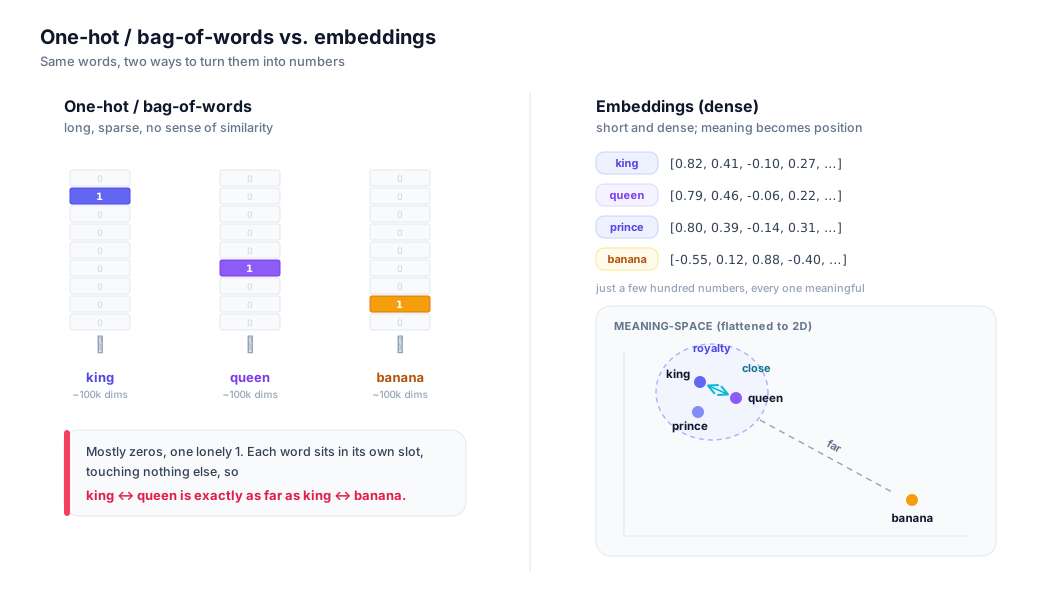
Now represent a single word as a list of numbers, one slot per vocabulary word, where every slot is 0 except the one slot for this word, which is 1. That’s one-hot encoding: one slot is “hot” (set to 1) and all the rest are cold. If “king” is word number 5,732 in your vocabulary, then “king” becomes a list of, say, 100,000 numbers that is all zeros except for a single 1 at position 5,732.
It’s a valid way to turn a word into numbers. It’s also useless for meaning, for two reasons that will come up again and again.
First, the lists are enormous and almost entirely empty. A list that is 100,000 numbers long but contains a single 1 is what we call a sparse vector: a vector whose entries are mostly zero. (A vector, for our purposes, is just an ordered list of numbers. We’ll make that definition sharper in a moment.) Sparse vectors are wasteful to store and slow to work with at scale.
Second, and this is the fatal one: one-hot vectors carry no notion of similarity whatsoever. Every word sits in its own private slot, touching nothing else. The vector for “king” and the vector for “queen” each have their single 1 in a different position, so by any measure of closeness they are exactly as far apart as “king” and “banana.” The encoding has no way to express that kings and queens have anything to do with each other. Meaning was never captured; we only captured identity, the bare fact that this word is not that word.
Naive idea 2: bag-of-words
A step up is bag-of-words. Instead of encoding a single word, we encode a whole passage by counting how many times each vocabulary word appears in it. The passage becomes one long vector over the vocabulary, where most slots are 0 and a few hold counts like 1, 2, 3. We call it a “bag” because we throw all the words into a sack and count them, keeping no record of their order: “the dog bit the man” and “the man bit the dog” produce the identical vector.
Bag-of-words is genuinely useful for some tasks, and it’s the ancestor of classic keyword search. But for meaning it hits the same wall. The vectors are still gigantic and sparse. Word order, which often carries the meaning, is thrown away. And worst of all, two passages are only considered similar if they reuse the same words. Go back to our running example. The chunk says “refunds are accepted within 30 days”; the question asks about a “refund window.” Almost no shared words, so bag-of-words rates them as barely related, even though they’re asking and answering the very same thing. Synonyms, paraphrases, the entire flexible texture of language: invisible to it.
Both naive methods fail for the same root reason. They encode the surface form of text, the literal characters, and never the meaning. What we want is the opposite: a representation where the meaning drives the numbers, so that “refund window” and “refunds within 30 days” come out close, and “refund window” and “banana bread recipe” come out far apart. That representation is an embedding. Here is the contrast, side by side, before we define it properly:
What an embedding actually is
Here’s the definition, plainly:
An embedding is a dense vector of numbers that represents a piece of text so that meaning becomes position in space: texts with similar meanings get vectors that sit close together, and texts with different meanings get vectors that sit far apart.
Let me unpack every load-bearing word in that sentence, because each one matters.
A vector is an ordered list of numbers, nothing more exotic than that. [0.7, -0.2, 0.9] is a vector. The order is part of the data: the first number means something different from the second. You can also picture a vector as a point or an arrow in space. The vector [0.7, -0.2, 0.9] is the point you reach by going 0.7 along the first axis, -0.2 along the second, and 0.9 along the third. That dual nature, “a list of numbers” and “a location in space,” is the whole reason this works, and we’ll lean on it constantly.
A dimension is one of those numbers, one slot in the list, one axis in the space. A 3-number vector is 3-dimensional and lives in a space we can actually draw. Real embeddings have hundreds or thousands of dimensions, which we’ll get to.
Dense is the contrast with the sparse vectors above. A dense vector has most or all of its entries carrying a real, nonzero value, like [0.021, -0.34, 0.88, 0.05, ...]. Where a one-hot vector wasted 100,000 slots to say one thing, a dense embedding might use just a few hundred slots, each of which contributes a little to the meaning. Nothing is wasted, and crucially, the numbers vary smoothly: nudge the meaning a little and the numbers move a little. That smoothness is exactly what lets “close in numbers” stand in for “close in meaning.”
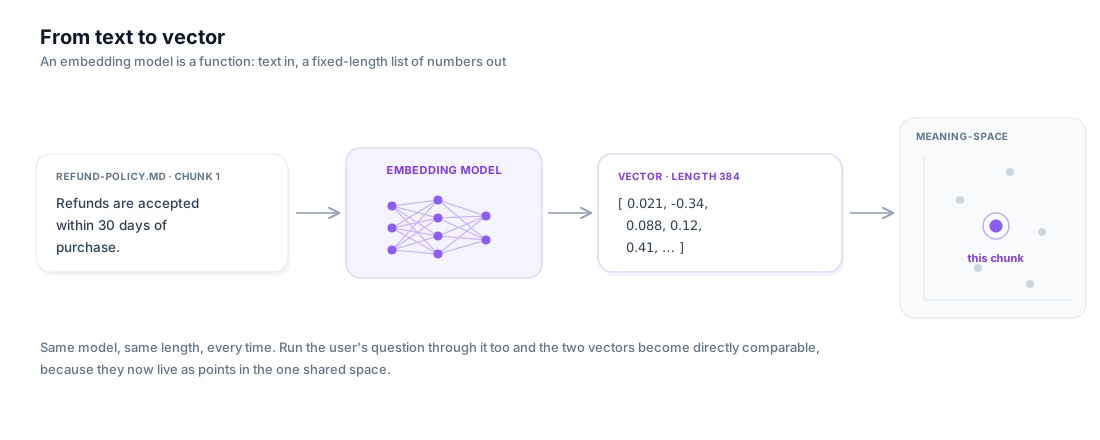
So an embedding takes a chunk of text in and gives a compact list of meaningful numbers out. Picture it as a machine, a function, with text on one side and a vector on the other.
Why meaning becomes geometry
This is the heart of the part, so let me build the intuition slowly.
Once every piece of text is a point in the same space, relationships between meanings turn into relationships between points: directions and distances. “Close together” comes to mean “similar in meaning.” “Far apart” means “different in meaning.” Whole regions of the space start to correspond to topics: there might be a corner where words about royalty live, another for animals, another for food.
The classic demonstration, and the one that made a lot of people fall in love with embeddings, is vector arithmetic on word embeddings. In the famous example, if you take the vector for “king,” subtract the vector for “man,” and add the vector for “woman,” the point you land on sits remarkably close to the vector for “queen”:
king − man + woman ≈ queen
Read that as movement through the space. Starting at “king,” the step “subtract man, add woman” is a little journey that means something like change the gender, keep the royalty, and when you make that exact journey starting from “king,” you arrive in the neighborhood of “queen.” The same “subtract man, add woman” step carries “actor” toward “actress,” and “uncle” toward “aunt.” The direction itself has captured a concept. Meaning didn’t just become position; it became geometry, with directions you can travel along.
I’ll be honest with you about this example, because the honesty is the lesson. That clean, almost magical arithmetic comes from older word embeddings (techniques like word2vec and GloVe from the 2010s), which give one fixed vector to each word. Modern embeddings, the kind RAG actually uses, embed whole sentences and passages, and they’re far richer and less tidy: you won’t get crisp “sentence minus sentence” analogies out of them. But the underlying intuition that the analogy makes vivid is exactly right and carries over completely: semantically related things end up near each other, and the layout of the space is meaningful. Keep that picture; just don’t expect every modern embedding to do party tricks with subtraction.
The figure below is the one I’d most like you to actually play with. It plots words as points in a 2D meaning-space, grouped into clusters you’ll recognize, and it animates that king − man + woman ≈ queen journey step by step so you can watch the arithmetic land. Hover any point to inspect it.
What an embedding model actually does
So where do these meaningful numbers come from? Nobody sits down and hand-assigns 0.021 to “refund.” The numbers are learned by an embedding model: a neural network trained on an enormous amount of text with one goal, to place semantically similar text close together in the space and dissimilar text far apart. You can stay at the level of intuition here; we are deliberately not opening up the transformer that sits inside. Treat the model as the function from the last figure: text in, vector out, with the placement learned from data.
But learned how? This is the part that feels like it shouldn’t be possible. How can a machine that has never lived in the world, never bought anything, never asked for a refund, figure out that “refund” and “reimbursement” are close in meaning? The answer is one of the most quietly profound ideas in language technology, the distributional hypothesis, summed up by the linguist J.R. Firth in 1957:
“You shall know a word by the company it keeps.”
The claim is that a word’s meaning is revealed by the contexts it appears in. “Refund,” “reimbursement,” and “money back” show up surrounded by the same neighbors: request, purchase, within X days, return, order. “Banana” keeps completely different company: ripe, peel, smoothie, bunch. A model that reads billions of sentences can notice these patterns of company, and it can do something clever with them: it nudges the vectors of words (and passages) that keep similar company toward each other, and words that keep different company apart. Do that across a huge slice of human text and the geometry we described earlier falls out on its own. The model never needed a dictionary. It needed company, at scale. That’s why this is even learnable from raw text: meaning leaves fingerprints in context, and the model is a fingerprint reader.
One distinction matters a lot for RAG. There are two flavors of embedding:
- Word embeddings give one vector per word, computed once and looked up like a dictionary. This is the world of the
king − man + womantrick. Useful, but limited: the word “bank” gets a single vector that has to awkwardly average the riverbank and the money-bank. - Sentence/passage embeddings give one vector for an entire sentence or passage, computed by reading the whole span together so context shapes the result. The chunk “Refunds are accepted within 30 days of purchase” becomes a single point that captures what the whole sentence is about.
RAG uses the sentence/passage kind. It has to: we retrieve chunks of meaning, not isolated words, and we want “refund window?” and “refunds within 30 days” to land near each other as complete thoughts. From here on, when I say “embedding,” picture the sentence/passage kind unless I say otherwise.
The catch: the space has hundreds of dimensions
I’ve been drawing the meaning-space in two dimensions, because a page is flat and two dimensions are all I can honestly draw. Real embeddings are not 2-dimensional. They typically have hundreds to thousands of dimensions: a small, fast model might output 384 numbers per text; common ones output 768 or 1,536; large ones go past 3,000. Each piece of text is a point in a space with that many axes.
Nobody can picture a 768-dimensional space, and you don’t need to. But you do need an honest mental model of what those pretty 2D scatter plots really are. They are flattened shadows. When we draw embeddings in 2D, we run them through a technique that squashes hundreds of dimensions down to two so they’ll fit on a screen, the same way a 3D object casts a 2D shadow on a wall. The shadow is genuinely useful (clusters in the shadow usually really are clusters) but it loses information, and points that look close in the flattened picture may be farther apart in the true space.
Why so many dimensions? Because meaning has many independent aspects at once, and each dimension gives the model another axis to vary. A single passage can be, simultaneously, about money, about a policy, formal in tone, written in English, time-sensitive, and customer-facing. Two dimensions force all of that to collapse onto a flat sheet where unrelated aspects collide; hundreds of dimensions give the model room to keep those shades on separate axes, so it can place “refund policy” near “return policy” yet still distinct from “privacy policy.” Our 2D drawings are the cartoon; the real space is roomier and finer than we can see.
The dimension count is a real engineering knob, not a curiosity. A small model like all-MiniLM-L6-v2 emits 384 numbers per text and runs comfortably on a CPU; OpenAI’s text-embedding-3-small emits 1,536 and text-embedding-3-large emits 3,072. More dimensions usually buys a little more accuracy, but you pay for every one of them, forever, in storage and in the cost of each search. Here’s the back-of-envelope that makes it concrete. Each number is typically a 4-byte float, so one 768-dimension vector is 768 × 4 ≈ 3 KB. Index a million chunks and that’s 1,000,000 × 768 × 4 bytes ≈ 3 GB of vectors alone, before any index overhead. Swap to a 1,536-dimension model and the same corpus is 6 GB; jump to 3,072 and it’s 12 GB. This is exactly why the Matryoshka trick below, and the dimension count on the leaderboard, are things you actually weigh rather than ignore.
Make it concrete (just enough)
Everything above is intuition, which is what this part is for. But it’s worth seeing, once, just how literal “text in, numbers out” really is. Here is the entire idea in a handful of lines. It is illustrative, meant to show you the shape of the thing, not a pipeline to build (that comes later in the series):
# Illustrative only: text in, a fixed-length vector out.
from sentence_transformers import SentenceTransformer

model = SentenceTransformer("all-MiniLM-L6-v2")

vector = model.encode("Refunds are accepted within 30 days of purchase.")

print(len(vector))   # 384  -> this model returns 384 numbers, every time
print(vector[:4])    # [0.021, -0.34, 0.088, 0.12]  (illustrative values)
That’s it. A sentence went in; a list of 384 numbers came out. Embed the user’s question the same way and you’d get another list of 384 numbers. The two lists are now directly comparable, because they live in the same 384-dimensional space, and “are these two texts about the same thing?” has quietly become “are these two points close together?” The exact numbers are meaningless to a human and I wouldn’t squint at them; what matters is the shape (a fixed-length dense vector) and the promise (similar meanings produce nearby vectors).
Back to RAG: now retrieval makes sense
Step back and look at what we can suddenly do. In Part 1 the pipeline had a station called embed that I asked you to take on faith. Now it’s not faith. Here is what those stations are really doing:
- At indexing time (done once, ahead of questions): we take every chunk of your documents, run each through the embedding model, and get a dense vector per chunk. We save all those vectors in the vector store from Part 1. Your knowledge base is now a cloud of points in meaning-space, one point per chunk.
- At query time (done per question): we run the user’s question through the same embedding model, getting one more point in the very same space. Then “find the relevant chunks” becomes beautifully concrete: find the stored points closest to the question’s point. Closest in space is closest in meaning, which is most relevant.
This is why our running example finally works. “What is our refund window?” and “Refunds are accepted within 30 days of purchase” share almost no words, so keyword search struggles. But a good sentence embedding places both near the same region of meaning-space, because they keep the same company, so the question’s point lands right next to the refund chunk’s point, and retrieval pulls back exactly the right page. That is “search by meaning,” and it’s the capability the rest of the pipeline is built on.
Which leaves one honest gap. I’ve kept saying “close” and “closest” as if it were obvious how to measure the distance between two points in a 768-dimensional space. It isn’t, quite, and the choice you make there has real consequences. That measurement is the whole subject of Part 3.
Choosing an embedding model
You don’t train your own embedding model; you pick one off the shelf. The good news is there are excellent ones, free and paid. The trap is choosing by vibes or by whatever the last blog post praised, so let me give you the literacy to read the field honestly.
The map most people start with is the MTEB leaderboard (the Massive Text Embedding Benchmark): a public ranking of embedding models across many tasks (retrieval, clustering, classification, semantic similarity) and many languages. Its cousin, BEIR, focuses specifically on zero-shot retrieval, scoring how well a model retrieves on datasets it was never tuned for. For RAG, the retrieval-flavored scores (MTEB’s retrieval slice, and BEIR) are the ones to weight; a model that tops the classification average can still be mediocre at finding the right chunk.
Three habits will keep you out of trouble reading these boards. First, MTEB has versions, and the scores are not comparable across them. The benchmark was overhauled (the v2 leaderboards changed which tasks and datasets are in the average, and the evaluation protocol), so a 70 on the new board and a 70 on the old one are different numbers; never line them up side by side. Second, look at the model’s output dimension and context length, not just its rank. A model that scores half a point higher but emits twice as many numbers per chunk may quietly double your storage and slow every search. Third, the leaderboard is a starting point, not a verdict. It measures average performance on public datasets, and your refund policies, your defense specs, your Turkish support tickets are not in those datasets. The only score that truly matters is the one you measure on your documents and your questions.
As of writing, a handful of models are the ones people reach for. On the open-weights side, Qwen3-Embedding (released in 0.6B, 4B, and 8B sizes, multilingual across roughly 119 languages, instruction-aware) sits at the top of the multilingual MTEB board; BGE-M3 is a popular multilingual workhorse that produces dense, sparse, and multi-vector outputs from one model. On the paid-API side, Voyage-3.5 (and the cheaper voyage-3.5-lite) target the cost/quality frontier for retrieval, Cohere Embed v4 is multilingual and multimodal with a 128k-token context, and OpenAI’s text-embedding-3 family is the default many teams already have keys for. Names and rankings churn every few months, so treat this paragraph as a snapshot, not gospel: go check the live board when you choose.
That brings up the question I get asked most: should I fine-tune an embedding model on my own data? The honest rule is start with a strong off-the-shelf model and only fine-tune when you have evidence it’s the bottleneck. Fine-tuning needs labeled pairs (queries matched to the right passages), a real evaluation set, and ongoing upkeep as your documents change, and a good general model is often already better than a hastily fine-tuned one. Reach for fine-tuning when your domain vocabulary is genuinely alien to general text (specialized jargon, internal part numbers, a low-resource language) and you’ve confirmed retrieval is what’s failing. For most teams, most of the time, picking the right off-the-shelf model and chunking well beats fine-tuning.
Matryoshka embeddings
Here’s a property worth knowing about, because it changes the cost math. Some modern models are trained with Matryoshka Representation Learning (MRL), named after the nested Russian dolls. The trick: during training, the model is pushed to pack the most important information into the earliest dimensions of the vector, so that the first 256 numbers are already a usable embedding on their own, the first 512 are a better one, and the full 1,024 are the best. One forward pass produces a vector you can truncate (slice off the tail) to any of these nested sizes after the fact, no re-embedding required.
Why care? Because dimensions cost money. A 1,024-dimension vector takes four times the storage and roughly four times the per-comparison work of a 256-dimension one. With an MRL model you can store the full vector, then run a fast first-pass search over the truncated 256-dimension prefixes to narrow millions of chunks down to a few hundred candidates, and only then re-rank those few with the full-length vectors. You trade a little accuracy for a lot of speed and storage, and you choose where on that curve to sit without retraining anything. OpenAI’s text-embedding-3 models expose this through a dimensions parameter, and Voyage and Cohere’s recent models support nested sizes too. When you see a model advertise dimensions like “256 / 512 / 1024,” that’s MRL talking.
When embeddings fail: language and domain mismatch
It’s tempting to treat an embedding model as a universal meaning-meter. It isn’t. A model only learned the geometry of the text it was trained on, and outside that distribution the space gets unreliable. Three mismatches bite hardest in practice.
Language. A model trained mostly on English builds an English-shaped space. Feed it Turkish and it will still emit a vector, confidently, but the placement is poor: synonyms don’t land near each other, and a Turkish question may sit closer to an unrelated English chunk than to its own Turkish answer. The fix is not a clever trick; it’s using a genuinely multilingual model (BGE-M3, multilingual-E5, Qwen3-Embedding, Cohere) when your corpus or your users aren’t all in English.
Code and structured text. Source code, log lines, config files, and tables don’t read like prose, and a prose-trained model places them clumsily. A query about a function and the function’s body can land far apart even though they’re “about” the same thing. If retrieval over code matters, use a model trained with code in its mix, or you’ll keep missing.
Specialized domains. Defense, medicine, and law are full of terms that are rare or differently-weighted in general web text. “TOYGUN,” a specific munition designation, an internal part number: a general model has barely seen these and gives them vague, poorly-separated vectors, so it can’t tell two distinct systems apart. This is exactly the situation where measuring on your own questions (and, if the gap is real, a domain-adapted or fine-tuned model) earns its keep. The failure is quiet: you get vectors and you get results, they’re just subtly wrong, which is why you have to test, not assume.
⚠️ Common pitfalls
- Embed your queries and your documents with the same model. The two vectors only live in a shared space, and “closest point” only means anything, if the same function produced both. Index your chunks with one model and query with another and you’re comparing points in two unrelated spaces; retrieval silently turns to noise. This includes versions: if you upgrade the model, you must re-embed the entire corpus, not just new queries.
- Mind asymmetric query/passage prefixes. Several strong models expect you to tell them which side is which. The E5 family wants you to prepend
query:to questions andpassage:to documents; older BGE models instead want an instruction like “Represent this sentence for searching relevant passages: ” prepended to queries only; Nomic models use task prefixes likesearch_query:andsearch_document:. Skip the prefix, or use the wrong one, and you lose a chunk of the model’s quality for free. Read the model card before you embed a single thing; the defaults are not universal.- Don’t compare scores across MTEB versions or across different models’ raw distances. A leaderboard number is only meaningful next to others computed the same way.
Try it yourself
The whole claim of this part is testable in a few lines, and seeing it happen on your own machine beats any diagram. Embed three short texts: the user’s question, the chunk that actually answers it, and one unrelated chunk. Then check that the question lands closest to the right chunk.
# Needs: pip install sentence-transformers
from sentence_transformers import SentenceTransformer, util

model = SentenceTransformer("all-MiniLM-L6-v2")   # small, 384-d, runs on CPU

query    = "What is our refund window?"
refund   = "Refunds are accepted within 30 days of purchase."
unrelated = "Our office is open Monday to Friday, 9am to 5pm."

q, r, u = model.encode([query, refund, unrelated])

print("query vs refund   :", round(float(util.cos_sim(q, r)), 3))
print("query vs unrelated:", round(float(util.cos_sim(q, u)), 3))
You should see the question score clearly higher against the refund chunk than against the office-hours chunk, even though the question and the refund chunk share almost no words. That gap is “search by meaning,” reduced to two numbers. Now poke at it: change the unrelated chunk to something about returns or cancellations and watch its score creep up (related meanings really do sit nearer); switch to a non-English question against English chunks and watch the gap collapse (the language mismatch from the section above, live). If you don’t want to install anything, the same experiment runs in any hosted notebook.
Key takeaways
- Computers compare numbers, not meanings, so search by meaning requires first turning text into numbers in a way that preserves meaning.
- The naive encodings fail instructively: one-hot and bag-of-words produce huge, mostly empty sparse vectors that capture spelling, not sense, so “king” is no closer to “queen” than to “banana.”
- An embedding is a compact dense vector that represents text so that meaning becomes position: similar meanings land close, different meanings land far. Relationships between meanings become directions and distances you can measure.
- An embedding model is a neural network that learns this layout from raw text via the distributional hypothesis, “you shall know a word by the company it keeps.” RAG uses sentence/passage embeddings, not single-word ones.
- Real embeddings live in hundreds or thousands of dimensions; the 2D pictures we draw are flattened shadows, and the extra dimensions are the room the model needs to separate fine shades of meaning.
- This is what makes RAG’s retrieve step work: embed the chunks, embed the question into the same space, and “relevant” simply means “closest point.”
References
- Firth, J.R. (1957). A Synopsis of Linguistic Theory, 1930–1955. In Studies in Linguistic Analysis. Oxford: Blackwell. (Source of “You shall know a word by the company it keeps,” the distributional hypothesis.)
- Mikolov, T., Chen, K., Corrado, G., & Dean, J. (2013). Efficient Estimation of Word Representations in Vector Space. arXiv:1301.3781. arxiv.org/abs/1301.3781 (word2vec; the home of
king − man + woman ≈ queen.) - Pennington, J., Socher, R., & Manning, C.D. (2014). GloVe: Global Vectors for Word Representation. EMNLP 2014, pp. 1532–1543. aclanthology.org/D14-1162
- Muennighoff, N., Tazi, N., Magne, L., & Reimers, N. (2022). MTEB: Massive Text Embedding Benchmark. arXiv:2210.07316. arxiv.org/abs/2210.07316
Glossary
- Vector: an ordered list of numbers, which can also be read as a point or arrow in space. The order matters; each position carries its own meaning.
- Dimension: one number in a vector, equivalently one axis of the space it lives in. A vector of 384 numbers is 384-dimensional.
- Vector space: the space all your vectors live in, with one axis per dimension. Texts become points in it, and “meaning” becomes their arrangement.
- Sparse vector: a vector whose entries are mostly zero (like one-hot or bag-of-words), usually very long and wasteful, with no built-in sense of similarity.
- Dense vector: a vector whose entries are mostly nonzero and meaningful, typically far shorter than a sparse one; the form embeddings take.
- One-hot encoding: representing a word as a vector that is all zeros except a single
1in the slot for that word. Captures identity, not meaning. - Bag-of-words: representing a passage by counting how often each vocabulary word appears, ignoring order. Captures word overlap, not meaning.
- Embedding: a dense vector representing a piece of text so that similar meanings produce nearby vectors; what lets a computer search by meaning. (“Embedding” is the representation; “vector” is its raw form.)
- Embedding model: the neural network that converts text into an embedding, having learned from large amounts of text where each piece of text should sit.
- Distributional hypothesis: the idea that a word’s meaning is revealed by the contexts it appears in (“you shall know a word by the company it keeps”); why embeddings can be learned from raw text at all.
- Word embedding: an embedding computed per individual word, looked up like a dictionary; the home of the
king − man + woman ≈ queentrick. - Sentence/passage embedding: an embedding computed for a whole span of text read together, so context shapes the result; the kind RAG uses.
- Semantic similarity: how close two pieces of text are in meaning, which in embedding-space shows up as how close their vectors are.
- MTEB / BEIR: public benchmarks for ranking embedding models. MTEB (Massive Text Embedding Benchmark) spans many tasks and languages; BEIR focuses on zero-shot retrieval. MTEB scores are not comparable across benchmark versions.
- Matryoshka embedding (MRL): an embedding trained so the most important information sits in its earliest dimensions, letting you truncate one vector to smaller sizes (e.g. 1,024 → 256) to trade a little accuracy for less storage and faster search, with no re-embedding.
- Query/passage prefix: a short tag (like
query:/passage:for E5,search_query:/search_document:for Nomic, or a query-side instruction string for older BGE models) some models require you to prepend so they know which side of a search a text is; using the wrong one or none degrades quality.
Next up, Part 3: Measuring Similarity. We can now turn any text into a point in meaning-space, and we’ve leaned hard on the words “close” and “closest.” Next we make those words precise: how do you actually measure the distance between two vectors, why is cosine similarity the usual answer for embeddings, and what changes when you do it across millions of points?